Tuesday, July 29, 2014

Some parts have arrived and got my hands started in building a quadcopter

Some parts turned up today to build my quadcopter, the F450 frame box was damaged.


All the parts seem to be in good physical order despite the damage on the box.  Below are the contents of a F450 frame kit, E300 propulsion system, Naza lite and legs.


Got my hands started after doing my usual stuff.  My kids kinda help me a bit.


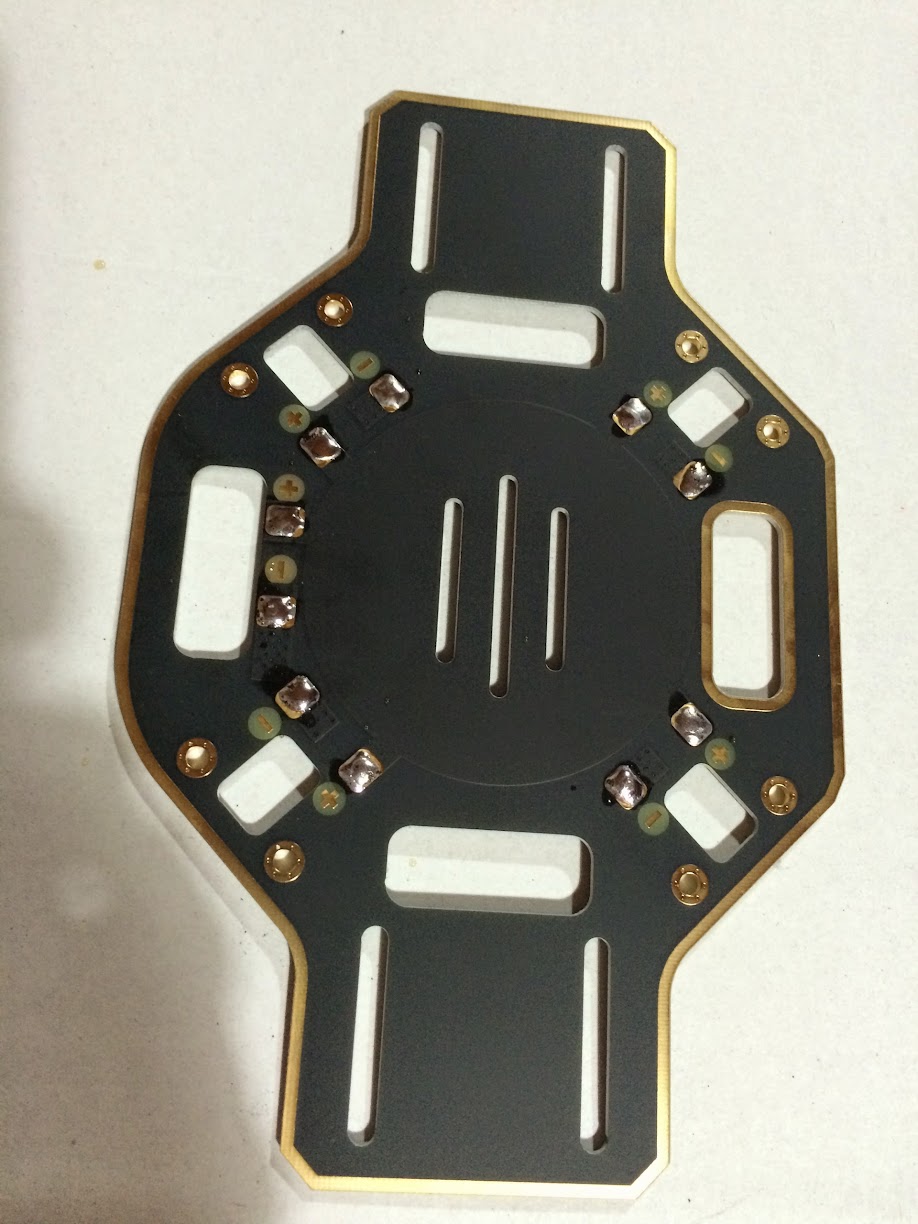
Got the soldering iron out and tinned the lower deck, which also serves as the power distribution board.


After smelling some lead from the solder and mustering out my basic soldering skills, I got all 4 Electronic Speed Controllers (ESC) done.


I need to stop here, as it late and I also did not have all the parts yet.  Hopefully some are coming tomorrow.  Oh here is a photo of the cheap 10 channel transmitter that comes with a Heli... hehehe.


Figuring out what quad copter to build

There are a lot of quad copter to build, lots of different choices.  My initial object for the build are:
  • Medium range (500m to 1000m) Aerial Photo (AP)
  • Basic First Person View (FPV) flying
These are my nice to have next objectives:
  • Long range (1km to 2km) AP
  • Full experience FPV
  • Unmanned Autonomous Vehicle (UAV) aka Drone
My likely dream hard-to-get objectives:
  • Night flying
  • Commercial application of UAV
  • Drone to drone communication to choreograph manoeuvres of a fleet of drones
Ok lets get back to more basic attainable objectives.  I have short listed it into 2 platforms:
  • DJI based quadcopter
  • 3D Robotics based quadcopter
Both have their strength and weaknesses.  I like the 3DR platform, as it based on open source and open hardware.  There platform is also more aligned to my nice to have objects.  The DJI products however based on research is more polished and a popular choice.  Its kinda like the difference between an Android phone and iPhone.  I use both phones, and there is no clear winner.

Then there is a 3rd option is combine both, use a DJI frame, motors, propellers and 3DR Flight Controller (FC), GPS, compass.  This is the ideal combination for me, I have seen also a few people gone through this route.

I have finally decided to build a DJI based quadcopter, then eventually move to a 3DR FC.  Using a DJI based quadcopter seems to be a more safer choice as this will be my first real quad and flying rc at the same time.  Once I understand better on how things work, then I move to a more custom quad.

Since I will be moving to a 3DR FC, I only bought a DJI Naza lite FC to keep the cost down.  The frame would be a DJI F450 Flamewheel as it a pretty versatile platform.  I will couple it with a DJI E300 propulsion system.

useful links:
http://www.quadcoptersarefun.com/
http://3drobotics.com/
http://www.dji.com
http://www.rcgroups.com/forums/showthread.php?t=2072672
http://vimeo.com/86967008

For the transmitter I wanted to have a Futaba one, as on my RC cars I used Futaba controllers.  The Futaba controllers cost a lot.  So looked around and found that the cheap ones are just as good like the FrSky Taranis 9XD.  Although I ended up getting a Walkera Devo 10; as it was cheaper, good enough and it can control a few Walkera helis that where pretty good.  So I ordered a Devo 10 that came with a Walker Master CP helicopter, this is how I sold it my wife:  "I need a transmitter, hey if I add $50 more I get to have a nice heli!"

Dreaming to Fly, make it real by building a quadcopter

Since I was a kid, I always wanted to fly a plane and helis.  Wasn't able to do it... yet.  The closest way for me to experience this is use a computer and flight simulator games.  Fast forward today while I was buying some parts for my RC cars which I play with my kids, I saw an AR Drone 2.0 on sale.  So I decided to buy it.  The rational behind it:  its not too expensive and if I don't get to have enough interest and time its a ready-to-fly (RTF) product.  The kids can use the AR Drone 2.0 without much fuss.


The AR Drone 2.0 was a pretty good starter quadcopter.  Here are some actual videos of it:


Now sold the AR Drone 2.0 and decided to move into more serious quads.  I wanted longer range, better stability against strong winds.   

Hopefully I can make a short series of post as I build a quadcopter.  This should be helpful for me as my notes on how I built it and if anybody is interested to do the same thing.

Saturday, April 19, 2014

Building opencv java module

Last week I tried to build OpenCV java module so I could use it for clj-drone so I could have more fun with AR Drone 2.0.  I couldn't figure out why the java module is set unavailable after cmake.  This happens on both Ubuntu 12.04 and OS X 10.9.  I have seen some issues regarding properly setting the JAVA_HOME and the cmake JNI file being incorrect.  I tried to look at this angle, seeing why the JNI interface would not work.

However it seems "ant" is a required component and not just a recommended install as indicated by the docs.  So after a "brew install ant" and "apt-get install ant" cmake is able to properly set the Java OpenCV module.  I never had ant for years in my system, right now only using mvn, sbt and lein.

OpenCV 2.4.5 built just fine on Ubuntu, OSX seems to be having some c++ compile issue...

Thursday, April 3, 2014

Learning Clojure by doing a simple things

I usually tinker around different languages or technology.  I have been learning a bit of Clojure for the last couple of weeks.  Tried it at the office, by making a simple REST client.  Now just making a simple web app, just to get a feel of the language and ecosystem around it.

Clojure reminds me of Tcl, I know its LISP and it should remind more of emacs.  It reminds me of Tcl as I done a lot of Tcl programming using aolserver and OpenACS before.  Unlike the first few times I used Ruby or Scala, where the first wow factor is the language.  Tcl and Clojure the wow factor is getting to do something really quick.  They both have quirky syntax, but simple and uniform.

Here is why I am learning Clojure:
  • Learning a new languages makes me better at the languages I already know.  Getting the nice feeling of being new, and learning a lot on the way... mistakes and aha moments.
  • Still on my journey to be a better Functional Oriented hipster.  Not that I am leaving Object Oriented or even procedural away, just learning a another way of thinking and solving computing issues.
  • Getting my son to learn something.  Clojure seems to have nice abstraction for sql, web and js.  Start with 1 language will be less intimidating, instead of learning a lot in 1 bang.
As a newbie, I started with a framework first.  I like get to know other people's opinion first before making my own.  I picked Luminus as it seem to be using some of things that the clojure community is using.  Here are some code snippets from bottom layer to top.  Its simple and lacks any real world complications yet, learn the ropes on the basic things first.

Data using Korma


It starts with a macro for defining an entity and I would guess the convention to tie with the backing rdbms tables.  Then you define some functions using Korma's sql dsl.  You deal with primarily 2 data structure "id" which is a string and "product" which is a map.

Web using Ring and Compojure


The above is defining the routes, which you tie to the application handler.  Real nice bits are the ability to define a context.  Which would mean enclosing routes will start with that path first.  Easy way to extract the request body from a key ":body-params", and to respond with body by setting the key ":body".

Finally the front end using Clojurescript, Gyr and Angular.js


It looks less Clojure idiomatic, however I wanted to start somewhere.  Angular.js is familiar to me, just realised that its been about 2 years ago I started looking at Angular.js.  We have been using it ever since, I am actually rusty on it already.  I saw the Gyr and Putnam project had pretty good documentation.  Gyr gives some macros such as def.factory, def.controller, etc.  which looks similar to normal angular.  Then the ability to use $scope.foo.bar which is pretty nice.  You will need to use "obj" and "arr" to interact with normal Javascript objects and arrays.

Clojure is nice and simple (still on first impression).  Gets you up and running quick.  If its good for long big projects, I don't know yet.  However I will be happy if I can meet 2 out of my 3 objectives in learning Clojure.  Complete source code here for the curious.

Thursday, May 16, 2013

Flashing bios using a usb drive

If you are like me where most PC run's linux and has no optical drive.  I saw the following steps around the net to be helpful.
  1. Get the bios update iso
  2. Get 'geteltorito' and extract the boot image from the iso
    $ wget 'http://www.uni-koblenz.de/~krienke/ftp/noarch/geteltorito/geteltorito.pl'
    $ perl geteltorito.pl biosupdate.iso > biosupdate.img
    
  3. Copy the image to the usb thumdrive
  4. $ sudo dd if=biosupdate.img of=/dev/usbthumdrive bs=512K

Saturday, April 13, 2013

Small Android stick (mk808b) mini review

Me and my mates at the office just bought one of those Android mk808b.  Its dirt cheap, so we gave it a try.

So far its been pretty good.  I plugged to an existing TV with hdmi and I can now use the TV for browsing, watching streaming videos and skype.  Since I am a Linux user I got a UVC compliant webcam, which works on this device as Android uses a Linux kernel.  So with little a fraction of a cost I was able to turn my old TV into what they call a smart TV (didn't like the idea of smart tv, never bought one).  Normally before this TV had a laptop plugged into it, now Android stick pc replaced it.

Pros (would not elaborate on it too much, lots of people have put heaps of comments around the web)
  • Low cost.  These cost about $50-90 around the net.  Also as part of the low cost, is that you can use your existing TV as long as it has a hdmi input.
  • Small and low power.  This comes with a USB adapter.  However I had mine just plugged into my xbox 360 usb port, even way better.
  • Newer firmware comes pre-rooted.  Mine is already rooted.
Cons
  • Clearly Android is for touch.  I bought the bundled air mouse, you can also use normal usb mouse and keyboard.  However the experience is not as nice, same experience as running the Android developer emulator on your PC.  You can only use apps that will run with single touch operations or single touch swipes.  Youtube, web browsers, skype, angry birds will be ok.  However google maps (no pinch zoom, so I don't know how to zoom out.. zoom in can done via double tap).  My idea was to get my tablet back from my kids, however this clearly an inferior experience for them.  So it kinda did not work, and now they can tell me to use my stick Android and they will use the Android tablet.  Plan back-fired.
  • Its not well polished.  This can leave a poor impression on Android for users having this as their first Android device.   Though this is Jelly Bean, its really far away from the experience you have from a Nexus 4, even from a 2 year old Asus Transformer.
  • It seems the cpu stays at 1 ghz no matter what the load is.  Now sure why I haven't played with the governor yet.  So it doesn't go 1.6ghz or drops down to 200-400mhz.
  • The out display seems to be 16 bit (not sure but it looks like it), also always resets to 720p after every boots up.  I read that you will need to reflash so it renders the color in 24/32 bit.  Again doesn't look that good, but not too bad if don't look for image issues (gradients and dithers).
  • The air mouse is sensitive to interference.  I am still running on 2.4 wifi, I have not much other devices and neighbors are far away.  However you can see during real big burst of traffic the air mouse is getting cut off as seen by the lag.
So the android stick PC is not really dirt cheap as it seems to be.  This is probably not a good first Android device.  However is a great bargain if.  You have a TV that you want to run some basic computing needs (web browsing, video calls, streaming video, music playing).  You can upgrade the TV and replace an aging laptop that used to perform those computing needs.

In order for the stick PC to have a great experience you need to buy a good input device.  Which would now increase the cost.  It also doesn't have a screen, no battery, etc.  So a Nexus 7 would probably be cheaper as a first good Android device.